> ## Documentation Index
> Fetch the complete documentation index at: https://base-a060aa97-eb-mini-app-ia-overhaul.mintlify.site/llms.txt
> Use this file to discover all available pages before exploring further.
# Accept Payments
> Add one-tap USDC payments to your app with the pay() helper and Base Pay Button.
export const SignInWithBaseButton = ({colorScheme = 'light'}) => {
const isLight = colorScheme === 'light';
return ;
};
export const BasePayButton = ({colorScheme = 'light'}) => {
const isLight = colorScheme === 'light';
return ;
};
## Why Base Pay?
USDC on Base is a fully-backed digital dollar that settles in seconds and costs pennies in gas. Base Pay lets you accept those dollars with a single click—no cards, no FX fees, no chargebacks.
* **Any user can pay** – works with every Base Account (smart-wallet) out of the box.
* **USDC, not gas** – you charge in dollars; gas sponsorship is handled automatically.
* **Fast** – most payments confirm in \<2 seconds on Base.
* **Funded accounts** – users pay with USDC from their Base Account or Coinbase Account.
* **No extra fees** – you receive the full amount.
**Please Follow the Brand Guidelines**
If you intend on using the BasePayButton, please follow the [Brand Guidelines](/base-account/reference/ui-elements/brand-guidelines) to ensure consistency across your application.
## Client-side (Browser SDK)
```ts Browser (SDK)
import { pay, getPaymentStatus } from '@base-org/account';
// Trigger a payment – user will see a popup from their wallet service
try {
const payment = await pay({
amount: '1.00', // USD amount (USDC used internally)
to: '0xRecipient', // your address
testnet: true // set false for Mainnet
});
// Option 1: Poll until mined
const { status } = await getPaymentStatus({
id: payment.id,
testnet: true // MUST match the testnet setting used in pay()
});
if (status === 'completed') console.log('🎉 payment settled');
} catch (error) {
console.error(`Payment failed: ${error.message}`);
}
```
**Important:** The `testnet` parameter in `getPaymentStatus()` must match the value used in the original `pay()` call. If you initiated a payment on testnet with `testnet: true`, you must also pass `testnet: true` when checking its status.
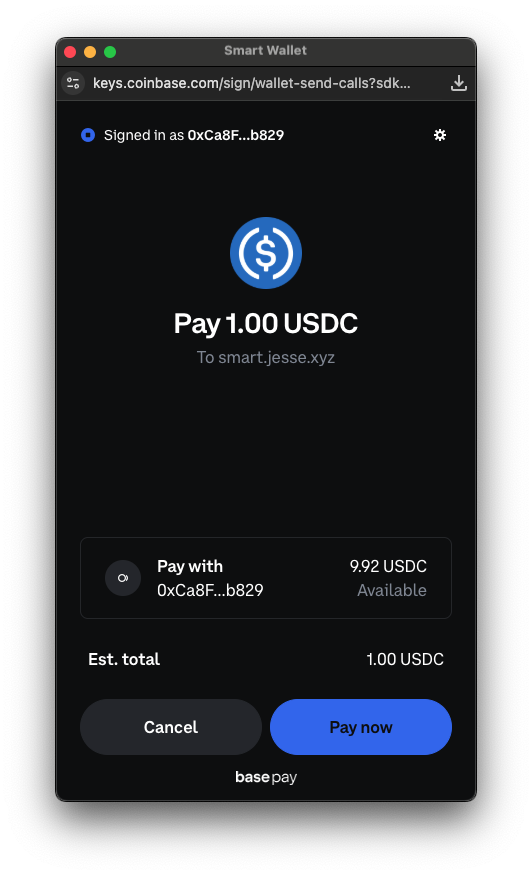
This is what the user will see when prompted to pay:
### Collect user information (optional)
Need an email, phone, or shipping address at checkout? Pass a payerInfo object:
```ts
try {
const payment = await pay({
amount: '25.00',
to: '0xRecipient',
payerInfo: {
requests: [
{ type: 'email' },
{ type: 'phoneNumber', optional: true },
{ type: 'physicalAddress', optional: true }
],
callbackURL: 'https://your-api.com/validate' // Optional - for server-side validation
}
});
console.log(`Payment sent! Transaction ID: ${payment.id}`);
// Log the collected user information
if (payment.payerInfoResponses) {
if (payment.payerInfoResponses.email) {
console.log(`Email: ${payment.payerInfoResponses.email}`);
}
if (payment.payerInfoResponses.phoneNumber) {
console.log(`Phone: ${payment.payerInfoResponses.phoneNumber.number}`);
console.log(`Country: ${payment.payerInfoResponses.phoneNumber.country}`);
}
if (payment.payerInfoResponses.physicalAddress) {
const address = payment.payerInfoResponses.physicalAddress;
console.log(`Shipping Address: ${address.name.firstName} ${address.name.familyName}, ${address.address1}, ${address.city}, ${address.state} ${address.postalCode}`);
}
}
} catch (error) {
console.error(`Payment failed: ${error.message}`);
}
```
Supported request types:
| type | returns |
| ---------------------------- | ----------------------------------------------------------------------------------------------------- |
| email | string |
| name | \{ firstName, familyName } |
| phoneNumber | \{ number, country } |
| physicalAddress | [full address object](/base-account/reference/core/capabilities/datacallback#physical-address-object) |
| onchainAddress | string |
Required by default — set optional: true to avoid aborting the payment if the user declines.
**How to validate the user's information?**
You can use the `callbackURL` to validate the user's information on the server side.
Learn more about this in the [callbackURL reference](/base-account/reference/core/capabilities/datacallback).
## Polling example
```ts Backend (SDK)
import { getPaymentStatus } from '@base-org/account';
export async function checkPayment(txId, testnet = false) {
const status = await getPaymentStatus({
id: txId,
testnet // Must match the testnet setting from the original pay() call
});
if (status.status === 'completed') {
// fulfil order
}
}
```
## Add the Base Pay Button
Use the pre-built component for a native look-and-feel:
```tsx title="Checkout.tsx"
import { BasePayButton } from '@base-org/account-ui/react';
import { pay } from '@base-org/account';
export function Checkout() {
const handlePayment = async () => {
try {
const payment = await pay({ amount: '5.00', to: '0xRecipient' });
console.log(`Payment sent! Transaction ID: ${payment.id}`);
} catch (error) {
console.error(`Payment failed: ${error.message}`);
}
};
return (
);
}
```
See full props and theming options in the [Button Reference](/base-account/reference/ui-elements/base-pay-button) and [Brand Guidelines](/base-account/reference/ui-elements/brand-guidelines).
**Please Follow the Brand Guidelines**
If you intend on using the BasePayButton, please follow the [Brand Guidelines](/base-account/reference/ui-elements/brand-guidelines) to ensure consistency across your application.
## Test on Base Sepolia
1. Get test USDC from the Circle Faucet (select "Base Sepolia").
2. Pass testnet: true in your pay() and getPaymentStatus() calls.
3. Use Sepolia BaseScan to watch the transaction.