> ## Documentation Index
> Fetch the complete documentation index at: https://base-a060aa97-eb-mini-app-ia-overhaul.mintlify.site/llms.txt
> Use this file to discover all available pages before exploring further.
# Content Types for Chat Agents
> Learn about supported XMTP content types and how to use them in your chat agent
## Content types
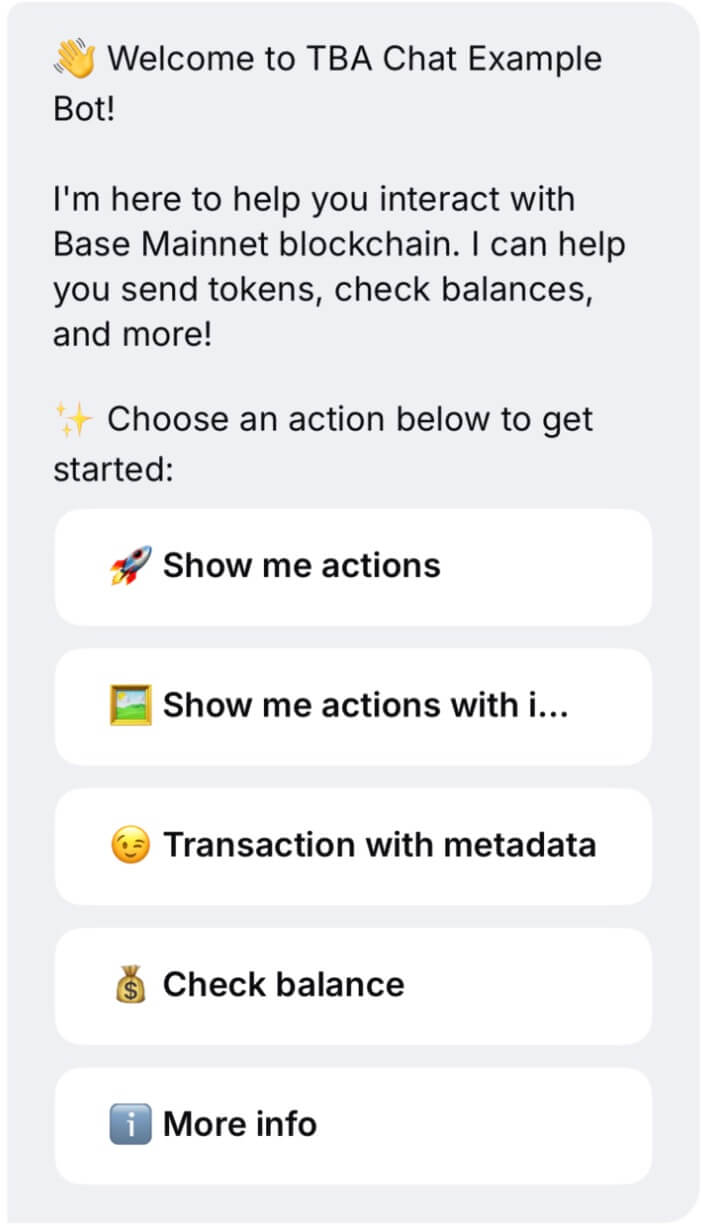
Base App supports various XMTP content types for rich messaging capabilities. This document outlines all supported content types, including custom types for Quick Actions and Intent.
XMTP uses content types to define the structure and meaning of message types.
We'll outline the standard and custom XMTP content types you can utilize in your agent.
### XMTP Content Types
**Text Messages**
* Content Type: `xmtp.org/text:1.0`
* Purpose: Basic text messaging
* Usage: Default for plain text
**Attachments**
* Content Type: `xmtp.org/attachment:1.0`
* Purpose: File attachments (inline)
* Usage: Send files directly in messages
**Remote Static Attachments**
* Content Type: `xmtp.org/remoteStaticAttachment:1.0`
* Purpose: Remote file attachments via URLs
* Usage: Reduce message size
**Reactions**
* Content Type: `xmtp.org/reaction:1.0`
* Purpose: Emoji reactions
* Usage: React to messages with emojis
* Note: Does not trigger read receipts
**Replies**
* Content Type: `xmtp.org/reply:1.0`
* Purpose: Threaded conversations
* Usage: Reply to specific messages
**Group Management**
* Content Types:
* `xmtp.org/group_membership_change:1.0`
* `xmtp.org/group_updated:1.0`
* Purpose: Membership & group metadata updates
* Usage: Automatic system messages
**Read Receipts**
* Content Type: `xmtp.org/readReceipt:1.0`
* Purpose: Read confirmations
* Usage: Sent automatically
**Transactions (Wallet Send Calls)**
* Content Type: `xmtp.org/walletSendCalls:1.0`
* Purpose: Request wallet actions from users
**Transaction Receipts**
* Content Type: `xmtp.org/transactionReference:1.0`
* Purpose: Share blockchain transaction info
### Base App Content Types
There are content types developed by the Base App team for agents in Base App. Other XMTP clients may not support these content types.
**Quick Actions (coinbase.com/actions:1.0)**
Purpose: Present interactive buttons in a message
Structure:
```typescript
type ActionsContent = {
id: string;
description: string;
actions: Action[];
expiresAt?: string;
};
type Action = {
id: string;
label: string;
imageUrl?: string;
style?: 'primary' | 'secondary' | 'danger';
expiresAt?: string;
};
```
Validation Rules:
* `id`, `description` are required
* `actions` must be 1–10 items with unique IDs
* Style must be one of: `primary`, `secondary`, `danger`
Fallback:
```
[Description]
[1] [Action Label 1]
[2] [Action Label 2]
...
Reply with the number to select
```
Example: Payment Options
```json
{
"id": "payment_alice_123",
"description": "Choose amount to send to Alice",
"actions": [
{ "id": "send_10", "label": "Send $10", "style": "primary" },
{ "id": "send_20", "label": "Send $20", "style": "primary" },
{ "id": "custom_amount", "label": "Custom Amount", "style": "secondary" }
],
"expiresAt": "2024-12-31T23:59:59Z"
}
```
 **Intent (coinbase.com/intent:1.0)**
Purpose: User expresses choice from Quick Actions
Structure:
```typescript
type IntentContent = {
id: string;
actionId: string;
metadata?: Record;
};
```
Validation Rules:
* `id`, `actionId` required
* Must match corresponding Actions
* `metadata` is optional, `<10KB`
Fallback:
```
User selected action: [actionId]
```
Example: Intent Message
```json
{
id: 'payment_alice_123',
actionId: 'send_10',
metadata: {
timestamp: Date.now(),
actionLabel: 'Send $10'
}
}
```
**Intent (coinbase.com/intent:1.0)**
Purpose: User expresses choice from Quick Actions
Structure:
```typescript
type IntentContent = {
id: string;
actionId: string;
metadata?: Record;
};
```
Validation Rules:
* `id`, `actionId` required
* Must match corresponding Actions
* `metadata` is optional, `<10KB`
Fallback:
```
User selected action: [actionId]
```
Example: Intent Message
```json
{
id: 'payment_alice_123',
actionId: 'send_10',
metadata: {
timestamp: Date.now(),
actionLabel: 'Send $10'
}
}
```
