import { createBaseAccountSDK } from "@base-org/account";
import { useCallback, useEffect, useState } from "react";
import { baseSepolia } from "viem/chains";

interface SubAccount {
  address: `0x${string}`;
  factory?: `0x${string}`;
  factoryData?: `0x${string}`;
}

interface GetSubAccountsResponse {
  subAccounts: SubAccount[];
}

interface WalletAddSubAccountResponse {
  address: `0x${string}`;
  factory?: `0x${string}`;
  factoryData?: `0x${string}`;
}

export default function SubAccountDemo() {
  const [provider, setProvider] = useState<ReturnType<
    ReturnType<typeof createBaseAccountSDK>["getProvider"]
  > | null>(null);
  const [subAccount, setSubAccount] = useState<SubAccount | null>(null);
  const [universalAddress, setUniversalAddress] = useState<string>("");
  const [connected, setConnected] = useState(false);
  const [loadingSubAccount, setLoadingSubAccount] = useState(false);
  const [loadingUniversal, setLoadingUniversal] = useState(false);
  const [status, setStatus] = useState("");

  // Initialize SDK and crypto account
  useEffect(() => {
    const initializeSDK = async () => {
      try {
        const sdkInstance = createBaseAccountSDK({
          appName: "Sub Account Demo",
          appLogoUrl: "https://base.org/logo.png",
          appChainIds: [baseSepolia.id],
        });

        // Get the provider
        const providerInstance = sdkInstance.getProvider();
        setProvider(providerInstance);

        setStatus("SDK initialized - ready to connect");
      } catch (error) {
        console.error("SDK initialization failed:", error);
        setStatus("SDK initialization failed");
      }
    };

    initializeSDK();
  }, []);

  const connectWallet = async () => {
    if (!provider) {
      setStatus("Provider not initialized");
      return;
    }

    setLoadingSubAccount(true);
    setStatus("Connecting wallet...");

    try {
      // Connect to the wallet
      const accounts = (await provider.request({
        method: "eth_requestAccounts",
        params: [],
      })) as string[];

      const universalAddr = accounts[0];
      setUniversalAddress(universalAddr);
      setConnected(true);

      // Check for existing sub account
      const response = (await provider.request({
        method: "wallet_getSubAccounts",
        params: [
          {
            account: universalAddr,
            domain: window.location.origin,
          },
        ],
      })) as GetSubAccountsResponse;

      const existing = response.subAccounts[0];
      if (existing) {
        setSubAccount(existing);
        setStatus("Connected! Existing Sub Account found");
      } else {
        setStatus("Connected! No existing Sub Account found");
      }
    } catch (error) {
      console.error("Connection failed:", error);
      setStatus("Connection failed");
    } finally {
      setLoadingSubAccount(false);
    }
  };

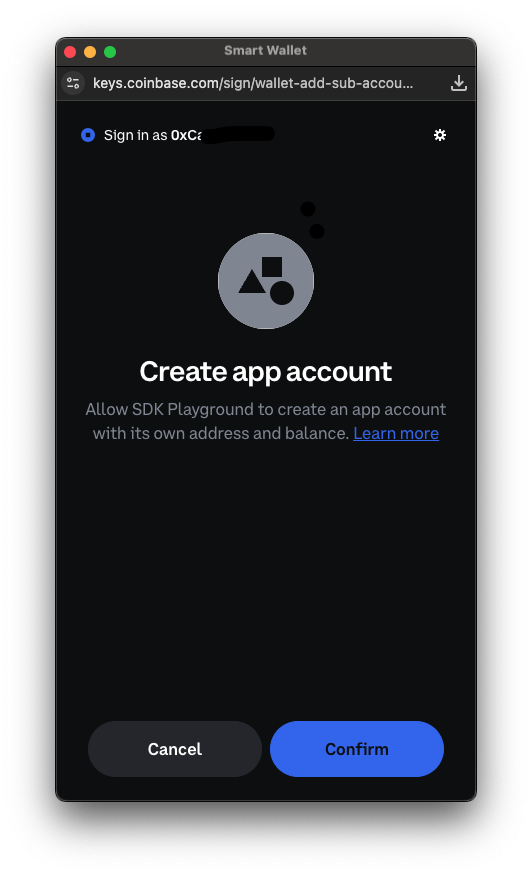
  const createSubAccount = async () => {
    if (!provider) {
      setStatus("Provider not initialized");
      return;
    }

    setLoadingSubAccount(true);
    setStatus("Creating Sub Account...");

    try {
      const newSubAccount = (await provider.request({
        method: "wallet_addSubAccount",
        params: [
          {
            account: {
              type: 'create',
            },
          }
        ],
      })) as WalletAddSubAccountResponse;

      setSubAccount(newSubAccount);
      setStatus("Sub Account created successfully!");
    } catch (error) {
      console.error("Sub Account creation failed:", error);
      setStatus("Sub Account creation failed");
    } finally {
      setLoadingSubAccount(false);
    }
  };

  const sendCalls = useCallback(
    async (
      calls: Array<{ to: string; data: string; value: string }>,
      from: string,
      setLoadingState: (loading: boolean) => void
    ) => {
      if (!provider) {
        setStatus("Provider not available");
        return;
      }

      setLoadingState(true);
      setStatus("Sending calls...");

      try {
        const callsId = (await provider.request({
          method: "wallet_sendCalls",
          params: [
            {
              version: "2.0",
              atomicRequired: true,
              chainId: `0x${baseSepolia.id.toString(16)}`, // Convert to hex
              from,
              calls,
              capabilities: {
                // https://docs.cdp.coinbase.com/paymaster/introduction/welcome
                // paymasterUrl: "your paymaster url",
              },
            },
          ],
        })) as string;

        setStatus(`Calls sent! Calls ID: ${callsId}`);
      } catch (error) {
        console.error("Send calls failed:", error);
        setStatus("Send calls failed");
      } finally {
        setLoadingState(false);
      }
    },
    [provider]
  );

  const sendCallsFromSubAccount = useCallback(async () => {
    if (!subAccount) {
      setStatus("Sub account not available");
      return;
    }

    const calls = [
      {
        to: "0x4bbfd120d9f352a0bed7a014bd67913a2007a878",
        data: "0x9846cd9e", // yoink
        value: "0x0",
      },
    ];

    await sendCalls(calls, subAccount.address, setLoadingSubAccount);
  }, [sendCalls, subAccount]);

  const sendCallsFromUniversal = useCallback(async () => {
    if (!universalAddress) {
      setStatus("Universal account not available");
      return;
    }

    const calls = [
      {
        to: "0x4bbfd120d9f352a0bed7a014bd67913a2007a878",
        data: "0x9846cd9e", // yoink
        value: "0x0",
      },
    ];

    await sendCalls(calls, universalAddress, setLoadingUniversal);
  }, [sendCalls, universalAddress]);

  return (
    <div className="sub-account-demo">
      <h2>Sub Account Demo</h2>

      <div className="status">
        <p>
          <strong>Status:</strong> {status}
        </p>
        {universalAddress && (
          <p>
            <strong>Universal Account:</strong> {universalAddress}
          </p>
        )}
        {subAccount && (
          <p>
            <strong>Sub Account:</strong> {subAccount.address}
          </p>
        )}
      </div>

      <div className="actions">
        {!connected ? (
          <button
            onClick={connectWallet}
            disabled={loadingSubAccount || !provider}
            className="connect-btn"
          >
            {loadingSubAccount ? "Connecting..." : "Connect Wallet"}
          </button>
        ) : !subAccount ? (
          <button
            onClick={createSubAccount}
            disabled={loadingSubAccount}
            className="create-btn"
          >
            {loadingSubAccount ? "Creating..." : "Add Sub Account"}
          </button>
        ) : (
          <div>
            <button
              onClick={sendCallsFromSubAccount}
              disabled={loadingSubAccount}
              className="sub-account-btn"
            >
              {loadingSubAccount ? "Sending..." : "Send Calls from Sub Account"}
            </button>
            <button
              onClick={sendCallsFromUniversal}
              disabled={loadingUniversal}
              className="universal-btn"
            >
              {loadingUniversal
                ? "Sending..."
                : "Send Calls from Universal Account"}
            </button>
          </div>
        )}
      </div>

      <style jsx>{`
        .sub-account-demo {
          max-width: 600px;
          margin: 0 auto;
          padding: 20px;
          font-family: Arial, sans-serif;
        }

        .status {
          border-radius: 8px;
          margin: 20px 0;
        }

        .status p {
          margin: 5px 0;
        }

        .actions {
          margin: 20px 0;
        }

        .connect-btn,
        .create-btn,
        .sub-account-btn,
        .universal-btn {
          background: #0052ff;
          color: white;
          border: none;
          padding: 12px 24px;
          border-radius: 8px;
          cursor: pointer;
          font-size: 16px;
          margin-right: 15px;
          margin-bottom: 10px;
        }

        .connect-btn:disabled,
        .create-btn:disabled,
        .sub-account-btn:disabled,
        .universal-btn:disabled {
          background: #ccc;
          cursor: not-allowed;
        }

        .connect-btn:hover:not(:disabled),
        .create-btn:hover:not(:disabled),
        .sub-account-btn:hover:not(:disabled),
        .universal-btn:hover:not(:disabled) {
          background: #0041cc;
        }
      `}</style>
    </div>
  );
}